Description
Tech Specs
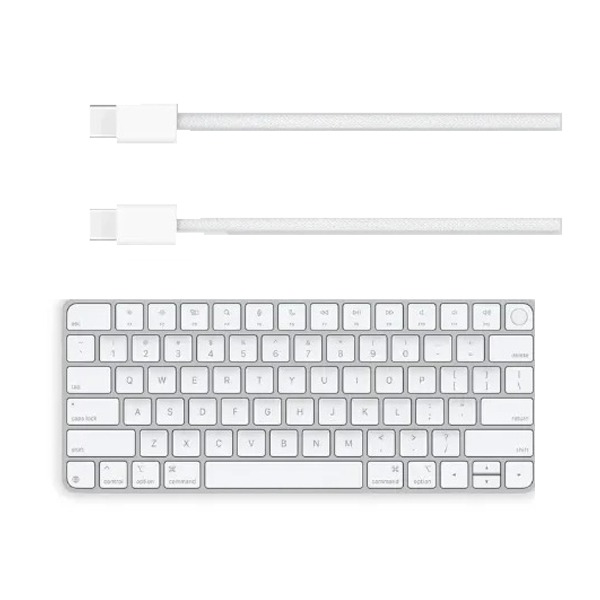
| Overview | Touch ID is now a feature of Magic Keyboard, offering quick, simple, and safe login and transaction authentication.
Typing with the Magic Keyboard with Touch ID is incredibly accurate and comfortable. Additionally, it is wireless and rechargeable, and its very long-lasting internal battery can keep your keyboard operating for at least a month between charges.¹ You may start working immediately because it links with your Mac instantly. All of your favorite gadgets can be charged with a single cable thanks to its USB-C port and braided USB-C Charge Cable, which pairs and charges by connecting to a USB-C port on your Mac. |
| What’s in the Box | Magic Keyboard with Touch ID
USB-C Charging Cable |
| Tech Specs | Size and Weight Height: 0.16–0.43 inch (0.41–1.09 cm)Width: 10.98 inches (27.89 cm)Depth: 4.52 inches (11.49 cm)Weight: 0.54 pound (0.243 kg)*General Multimedia keysConnections and Expansion BluetoothUSB-C portWireless |
| System Requirements | Mac with Apple silicon using macOS 15.1 or later |
| Compatibility | iPad Models iPad Pro 13-inch (M4) iPad Pro 12.9-inch (6th generation) iPad Pro 12.9-inch (5th generation) iPad Pro 12.9-inch (4th generation) iPad Pro 12.9-inch (3rd generation) iPad Pro 12.9-inch (2nd generation) iPad Pro 12.9-inch (1st generation) iPad Pro 11-inch (M4) iPad Pro 11-inch (4th generation) iPad Pro 11-inch (3rd generation) iPad Pro 11-inch (2nd generation) iPad Pro 11-inch (1st generation) iPad Pro 10.5-inch iPad Pro 9.7-inch iPad Air 13-inch (M2) iPad Air 11-inch (M2) iPad Air (5th generation) iPad Air (4th generation) iPad Air (3rd generation) iPad Air 2 iPad (10th generation) iPad (9th generation) iPad (8th generation) iPad (7th generation) iPad (6th generation) iPad (5th generation) iPad mini (A17 Pro) iPad mini (6th generation) iPad mini (5th generation) iPad mini 4 Mac Models MacBook Air (13-inch, M3, 2024) MacBook Air (15-inch, M3, 2024) MacBook Air (15-inch, M2, 2023) MacBook Air (13-inch, M2, 2022) MacBook Air (M1, 2020) MacBook Air (Retina, 13‑inch, 2020) MacBook Air (Retina, 13-inch, 2018–2019) MacBook Pro (14‑inch, 2024) MacBook Pro (16‑inch, 2024) MacBook Pro (14‑inch, 2023) MacBook Pro (16‑inch, 2023) MacBook Pro (13‑inch, M2, 2022) MacBook Pro (14‑inch, 2021) MacBook Pro (16-inch, 2021) MacBook Pro (16-inch, 2019) MacBook Pro (13-inch, M1, 2020) MacBook Pro (13-inch, 2020) iMac (24‑inch, M4, 2024) iMac (24-inch, M3, 2023) iMac (24-inch, M1, 2021) iMac (Retina 4K, 21.5‑inch, 2019) iMac (Retina 5K, 27-inch, 2019–2020) Mac Studio (2023) Mac Studio (2022) Mac mini (2024) Mac mini (2023) Mac mini (M1, 2020) Mac mini (2018) Mac Pro (2023) Mac Pro (2019) |
Apple Magic Keyboard Price in Bangladesh – MXCK3
Overview
A smooth and sophisticated typing experience is provided by the Apple Magic Keyboard with Touch ID and USB-C for Mac models with Apple Silicon (MXCK3), which is intended for those who value both style and utility. This keyboard, which is specifically designed to work with Apple Silicon and the company’s more recent Mac models, fits in seamlessly with your setup and improves security and efficiency. It provides an enhanced experience for daily chores, including as typing and system navigation, thanks to its user-friendly design and the most recent developments in connectivity.
Its integrated Touch ID feature allows customers to use a quick fingerprint scan to authorize apps, unlock their Mac, and make secure payments. For current Mac users who want efficiency and security without sacrificing flair, the addition of a USB-C port for charging guarantees a simple connection and quick recharging, making it a useful accessory.
Key Features
- Touch ID for Enhanced Security: A single touch of your finger can unlock your Mac, authorize online payments, and open secure programs thanks to the Apple Magic Keyboard’s built-in Touch ID. Fast and dependable, this extra biometric security layer boosts productivity and mental calm.
- USB-C Charging Port: There is a USB-C port, which makes charging quicker and easier. It only takes a few minutes to recharge the keyboard by plugging in a USB-C connection. By doing this, compatibility with contemporary Apple products is guaranteed and proprietary charging cords are no longer necessary.
- Compact and Ergonomic Design: The Magic Keyboard was created with comfort in mind. It has a low-profile, sleek design with scissor-switch, responsive keys that make typing enjoyable. Its small design fits perfectly into any desk and offers plenty of room for comfortable typing.
- Seamless Mac Integration: The keyboard is designed to work flawlessly with Macs that have Apple Silicon (M1, M2, and beyond). It connects easily over Bluetooth, guaranteeing a quick and dependable connection with little configuration needed. It couples with your Mac instantaneously, whether you’re using it at home or on the move.
- Long Battery Life: The keyboard’s energy-efficient design allows it to run on a single charge for up to a month. This guarantees you won’t have to worry about constantly charging your keyboard throughout the day.
- Environmentally Friendly: The Magic Keyboard is made using recyclable materials and environmentally responsible production techniques, just like other Apple products, so you can enjoy cutting-edge technology while reducing your carbon impact.
- Compatibility: The MacBook Air, MacBook Pro, Mac mini, and iMac are among the Mac models with Apple Silicon that the Magic Keyboard with Touch ID is especially designed to work with. For complete functioning, macOS 15.1 or later is required.