Description
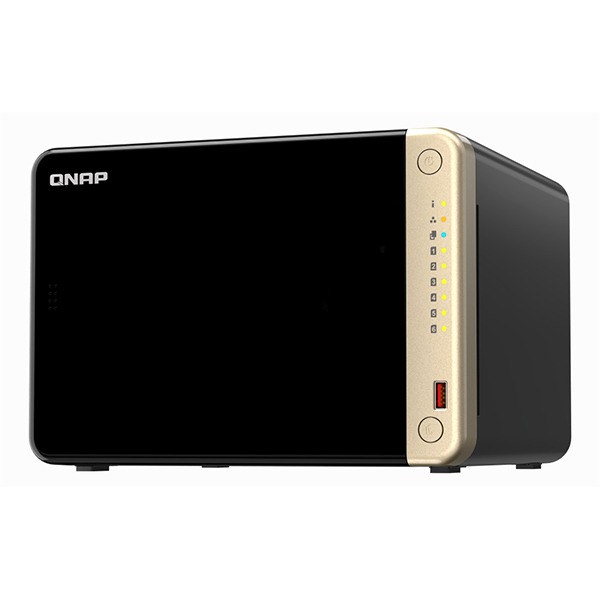
TS-832PXU-RP-4G Hardware Specs
| CPU | AnnapurnaLabs Alpine AL324 64-bit ARM® Cortex-A57 4-core 1.7GHz processor |
| CPU Architecture | 64-bit ARM |
| Floating Point Unit | ✓ |
| Encryption Engine | ✓ |
| System Memory | 4 GB UDIMM DDR4 (1 x 4 GB) |
| Maximum Memory | 16 GB (1 x 16 GB) |
| Memory Slot | 1 x UDIMM DDR4 |
| Flash Memory | 512 MB (Dual boot OS protection) |
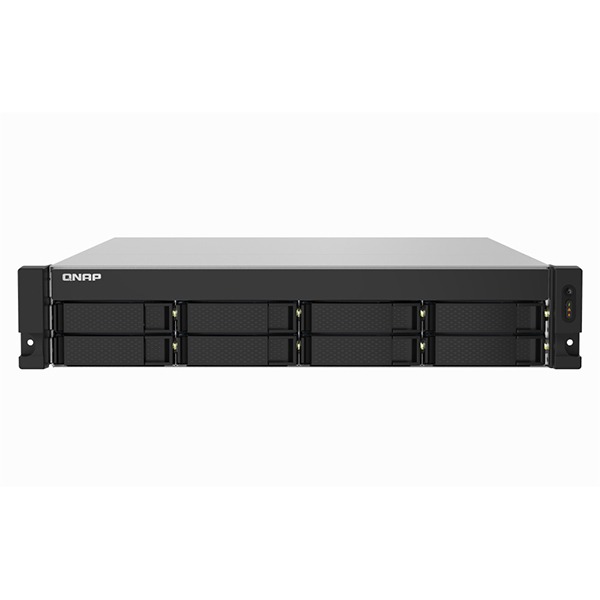
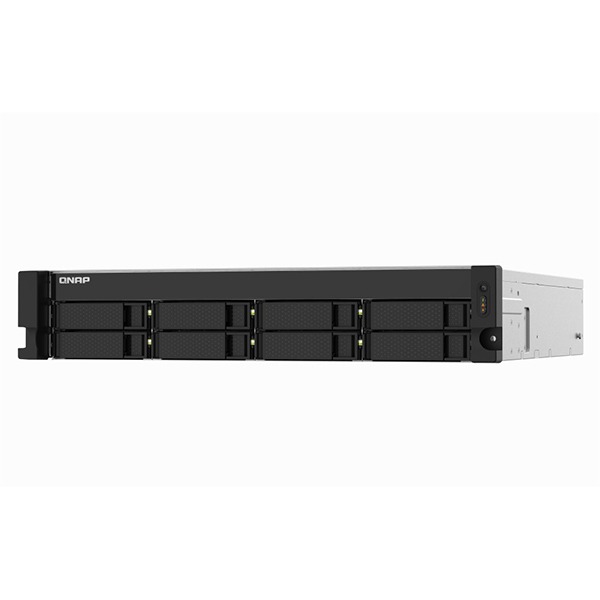
| Drive Bay | 8 x 3.5-inch SATA 6Gb/s, 3Gb/s |
| Drive Compatibility | 3.5-inch bays: 3.5-inch SATA hard disk drives 2.5-inch SATA hard disk drives 2.5-inch SATA solid state drives |
| Hot-swappable | (Not supported M.2 SSD) |
| M.2 Slot | Optional via a PCIe adapter |
| SSD Cache Acceleration Support | ✓ |
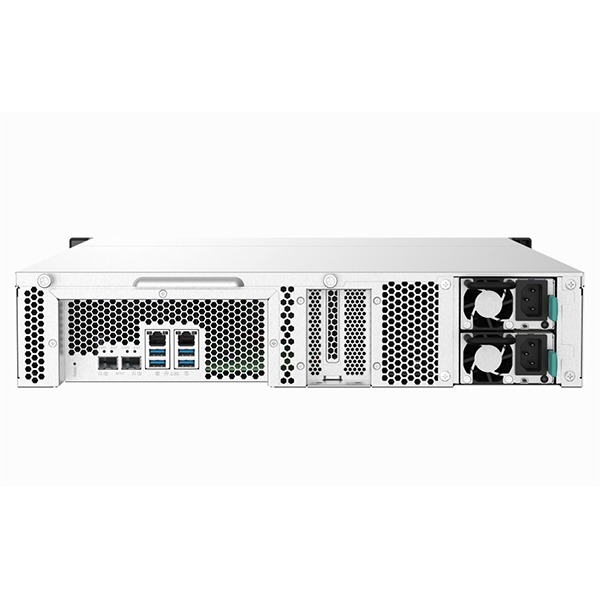
| 2.5 Gigabit Ethernet Port (2.5G/1G/100M) | 2 (2.5G/1G/100M/10M) |
| 10 Gigabit Ethernet Port | 2 x 10GbE SFP+ |
| Wake on LAN (WOL) |
Only the 2.5GbE port
|
| Jumbo Frame | ✓ |
| PCIe Slot | 1 Slot 1: PCIe Gen 2 x2 PCIe bandwidth limitations will restrict the NAS 10GbE performance.
Card dimensions for PCIe slot:220 x 68.9x 18.76 mm / 8.67 x 2.71 x 0.74 inches. |
| USB 3.2 Gen 1 port | 4 |
| Form Factor | 2U Rackmount |
| LED Indicators | HDD 1-8, Status, LAN, Storage expansion |
| Buttons | Power, Reset |
| Dimensions (HxWxD) | 88.6 × 432 × 511 mm
Excludes ear hook and the protruding part of the Power Supply Unit.
|
| Weight (Net) | 12.47 kg |
| Weight (Gross) | 14.61 kg |
| Operating Temperature | 0 – 40 °C (32°F – 104°F) |
| Storage Temperature | -20 – 70°C (-4°F – 158°F) |
| Relative Humidity | 5-95% RH non-condensing, wet bulb: 27˚C (80.6˚F) |
| Power Supply Unit | 250W (x2) PSU, 100 – 240V |
| Power Consumption: Operating Mode, Typical | 69.191 W
Tested with drives fully populated.
|
| Fan | 2 x 70mm, 12VDC |
| System Warning | Buzzer |
| Standard Warranty | 3 |
| Max. Number of Concurrent Connections (CIFS) – with Max. Memory | 700 |
TS-832PXU-RP-4G Software Specs
| Operating System | QTS 5.2.5 |
| Supported Client Operating Systems |
|
| Supported Browsers |
|
| Supported Languages | Chinese (Traditional & Simplified), Czech, Danish, Dutch, English, Finnish, French, German, Greek, Hungarian, Italian, Japanese, Korean, Norwegian, Polish, Portuguese (Brazil), Romanian, Russian, Spanish, Swedish, Thai, and Turkish |
| Storage Pool | ✓ |
| SED Storage Pool | ✓ |
| Maximum Pool size | 308 TB |
| Maximum number of storage pool | 128 |
| Volume Type | Thick, Thin, Static |
| Maximum volume size | 250 TB
Note: At least 4 GB RAM is required. |
| Maximum number of volume | 128 |
| Maximum shared folder size | 250 TB |
| Maximum number of shared folder | 512 |
| JBOD Expansion | ✓ |
| VJBOD / VJBOD Cloud | ✓ |
| iSCSI Service | ✓ |
| Fibre Channel Service | ✓ |
| LUN Type | Thick, Thin |
| File-based iSCSI LUN | ✓ |
| Block-based iSCSI LUN | ✓ |
| Maximum LUN size | 250 TB
Note: At least 4 GB RAM is required. |
| Maximum number of targets LUN | 128 |
| LUN feature |
|
| Auto Tiering |
Requires minimum 2GB memory. |
| RAID Type |
|
| RAID Group |
To ensure data security, system stability, and storage performance, the maximum number of drives for a single RAID group is now 16 (applicable to RAID 5, RAID 6, RAID TP, and subgroups of RAID 50 and RAID 60). Nevertheless, users can combine multiple RAID groups into a large storage pool that contains more than 16 drives, using RAID 50, RAID 60, or RAID 10 as the RAID configuration. This enhancement will only be applied to new RAID groups. All existing RAID groups and storage systems will not be affected. |
| RAID Level Migration | ✓ |
| RAID Expansion (by adding Disk) | ✓ |
| RAID Expansion (by replacing bigger Disks) | ✓ |
| Storage Pool Expansion (by adding RAID Group) | ✓ |
| RAID Hot Spare | Global, Local |
| RAID Sync/Rebuild/Scrubbing | ✓ |
| Internal drive | EXT4 |
| External drive | EXT3, EXT4, NTFS, FAT32, HFS+, and exFAT (optional for ARM model)
Note: To use exFat in certain models you must purchase an exFAT driver license from License Center. |
| Disk, Enclosure Locate | ✓ |
| Disk S.M.A.R.T. Scan | ✓ |
| Disk S.M.A.R.T. Data Migration | ✓ |
| Ironwolf Health Management | ✓ |
| Secure Erase | ✓ |
| SSD Trim | ✓ |
| SSD Life Estimation | ✓ |
| Disk Roaming | ✓ |
| Disk Standby | ✓ |
| Volume Snapshot | ✓ |
| LUN Snapshot | ✓ |
| Maximum Snapshot (Per System) | Check maximum number of snapshots of your NAS |
| Maximum Snapshot (Per Volume / LUN) | Check maximum number of snapshots of your NAS |
| Minimum Snapshot Interval | 5 minutes |
| Snapshot Retention Policy | ✓ |
| Self-serve Snapshot Recovery | ✓ |
| Application Consisted Snapshot | ✓ |
| Snapshot Full Clone | ✓ |
| Snapshot Replica / Vault | ✓ |
| SSD read-only Cache | ✓ |
| SSD read-write cache | ✓ |
| SSD write-only cache | ✓ |
| SSD Cache Maximum Size | Check your QNAP NAS cache capacity and RAM requirements |
| SSD Cache RAID | 0, 1, 5, 6, 10 |
| SSD profiling tool | ✓ |
| External Device Management | ✓ |
| Mount Smart Phone (MTP) | ✓ |
| External RAID Device (QNAP so on) Management (External Device Mode) | ✓ |
| External RAID Device (QNAP so on) Management (NAS Mode) | ✓ |
| File Server |
|
| FTP Server |
|
| Maximum FTP connection | 1024 |
| File Station (Web) | ✓ |
| Object Storage | ✓ |
| Local user account | 4,096 |
| Local group account | 512 |
| Domain user/group account | 200,000 |
| Domain Security | ✓ |
| Domain Controller | ✓ |
| Shared folder permission | ✓ |
| Advanced folder permission | , (AFP, CIFS/SMB, FTP, and File Station) |
| Windows ACL | , (CIFS/SMB) |
| User quota | ✓ |
| Group quota | ✓ |
| Folder quota | , (Snapshot shared folder) |
| Home folder | ✓ |
| Resource Monitor | ✓ |
| SNMP | V2, V3 |
| Network recycle bin |
|
| System Log & Notification Center | Log recording: 3,000 event per second |
| Smart Fan | ✓ |
| Schedule on/off | ✓ |
| Internet protocol | IPv4, IPv6 |
| Virtual Switch | ✓ |
| Port trunking | , (7 modes) |
| VLAN | ✓ |
| DHCP Server | ✓ |
| DDNS (Dynamic Domain Name Service) | ✓ |
| Network access protection with auto-blocking | SSH, Telnet, HTTP(S), FTP, CIFS/SMB, and AFP |
| Security Counselor | ✓ |
| Malware Remover | ✓ |
| AES 256-bit Volume Encryption validated by FIPS 140-2 CAVP | ✓ |
| 2-step verification | ✓ |
| Allow/Deny List | ✓ |
| Access Protection | ✓ |
| Service binding | ✓ |
| Firewall | ✓ |
| vSphere Web Client Plug-in | ✓ |
| VMware vSphere VAAI for iSCSI | ✓ |
| VMware vSphere VAAI for NAS | ✓ |
| Windows ODX | ✓ |
| Windows/VMware Snapshot Agent | ✓ |
| HTTP/HTTPS Connections | TLS 1.0/1.1/1.2/1.3 |
| Supports WebDAV Connection | ✓ |
| Supports Virtual Hosts | 32 |
| Qsync |
Note: At least 1 GB RAM is required. |
| [Qsync] Management Mode | User customization, Central |
| [Qsync] Qsync client supported platforms | Windows, macOS, Ubuntu, Android, and iOS |
| [Qsync] Maximum number of version control | 64 |
| HybridMount |
Note: At least 1 GB RAM is required. |
| [HybridMount] File Cloud Gateway | Concurrent Connections = 20 Upload & 20 Download |
| [HybridMount] Network Drive Mount | ✓ |
| [HybridMount] Free cloud gateway sessions | 2 |
| HBS (Hybrid Backup Sync) |
Note: At least 1 GB RAM is required. |
| [HBS (Hybrid Backup Sync)] NAS to NAS backup | ✓ |
| [HBS (Hybrid Backup Sync)] Cloud Backup | ✓ |
| [HBS (Hybrid Backup Sync)] Cloud Sync | ✓ |
| [HBS (Hybrid Backup Sync)] 2-way and Active Sync | ✓ |
| [HBS (Hybrid Backup Sync)] Apple Time Machine Backup | ✓ |
| [HBS (Hybrid Backup Sync)] External drive backup | ✓ |
| [HBS (Hybrid Backup Sync)] Maximum number of backup job | 400 |
| Boxafe |
Note: At least 4 GB RAM is required. |
| [Boxafe] Office 365 Backup | ✓ |
| [Boxafe] Google Workspace Backup | ✓ |
| [Boxafe] Full-text search | ✓ |
| Qsirch |
Note: This feature is supported by all QNAP NAS devices with at least 2 GB of memory |
| [Qsirch] Previews | Photos, music, videos, PDFs, Gmail, and others |
| [Qsirch] Integrate Mac Finder | ✓ |
| [Qsirch] Advanced picture search | ✓ |
| [Qsirch] Search filters | ✓ |
| QuMagie |
Note: At least 1 GB RAM is required. |
| [QuMagie] Browse photos | ✓ |
| [QuMagie] Virtual and smart albums | ✓ |
| [QuMagie] AI-assisted photo management | People, things, places, and others |
| Antivirus (free) | ✓ |
| QVPN Service |
Note: At least 1 GB RAM is required. |
| [QVPN Service] Remote Access | PPTP, L2TP/IPSec, OpenVPN, QBelt (QNAP proprietary) |
| [QVPN Service] Supportedd utility and mobile app | Windows, macOS, iOS, and Android |
| [QVPN Service] Supported maximum clients | 100 |
| LDAP Server | ✓ |
| RADIUS | ✓ |
| SQL server | ✓ |
| License Center | ✓ |
| Multimedia Console | ✓ |
| Photo Station | ✓ |
| Music Station | ✓ |
| Video Station | ✓ |
| Download Station | ✓ |
| Notes Station | ✓ |
| Qfiling | ✓ |
| Media Streaming add-on | ✓ |
| QmailAgent | ✓ |
| QuWAN | ✓ |
| DA Driver Analyzer | ✓ |
| Q’center |
Note: The application is available in the App Center and in virtual appliance marketplaces (VMware vSphere ESXi and Microsoft Hyper-V). |
| Q’center Server | ✓ |
| Q’center Agent | ✓ |
| Connect to Q’center | ✓ |
| Container Station |
Note: At least 1 GB RAM is required. |
| [Container Station] Supported type | LXC/LXD and Docker
Note: LXD has been supported after Container Station 2.4 |
| [Container Station] Docker Hub Registry | ✓ |
| [Container Station] Container importing and exporting | ✓ |
| [Container Station] Console mode | ✓ |
| QVR Pro |
Note: At least 4 GB RAM is required. The maximum number of channels supported varies by NAS model, network configuration, and camera settings. |
| [QVR Pro] Recording Technique | Index database based |
| [QVR Pro] License Type | Perpetual |
| [QVR Pro] User-defined trigger events | ✓ |
| [QVR Pro] Metadata | ✓ |
| [QVR Pro] QVR Pro Client (Desktop) | Windows, macOS, and QNAP HybridDesk Station |
| [QVR Pro] QVR Pro Client (Mobile) | Android and iOS |
| [QVR Pro] Recording camera streams | H.264 |
| [QVR Pro] Free built-in camera channels | 8 |
| QVR Elite |
Note: At least 1 GB RAM is required. The maximum number of channels supported varies by NAS model, network configuration, and camera settings. |
| [QVR Elite] Recording Technique | Standard MP4 file based |
| [QVR Elite] License Type | Subscription-based |
| [QVR Elite] User-defined trigger events | ✓ |
| [QVR Elite] QVR Pro Client (Desktop) | Windows, macOS, and QNAP HybridDesk Station |
| [QVR Elite] QVR Pro Client (Mobile) | Android and iOS |
| [QVR Elite] Recording camera streams | H.264 |
| [QVR Elite] Free built-in camera channels | 2 |
| QVR Pro Client | ✓ |
| [QVR Pro Client] Dynamic View Layout | ✓ |
| [QVR Pro Client] Windows | ✓ |
| [QVR Pro Client] Mac | ✓ |
| [QVR Pro Client] HybridDesktop | ✓ |
| [QVR Pro Client] iOS | ✓ |
| [QVR Pro Client] Android | ✓ |